2026-10-21
An hour app that writes its own timesheet
I work on several projects for several customers, often on the same day: a firmware fix for one, a PCB review for another, an hour on a service tool in between. At the end of the month I had to rebuild all of that from memory, commit logs and calendar entries, and then type it into an invoice. It was slow, and hours slipped through.
The odd thing is that my computer already knew. It saw every window, every commit and every meeting. So I built an hour app that uses that, and leaves me only the part a computer can't do: checking that it is right.
What it looks like
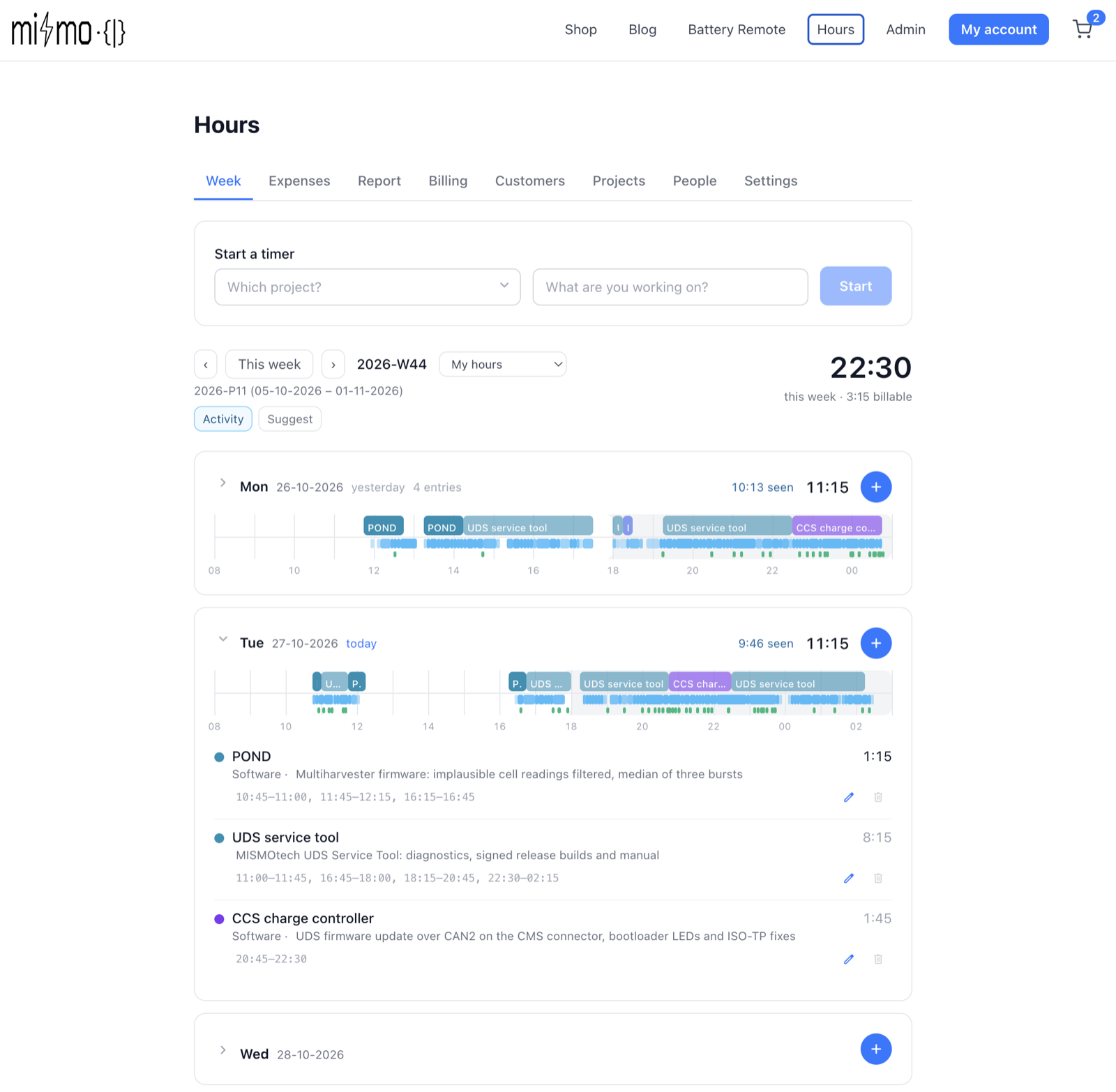
The week view shows each day as a timeline. The coloured blocks on top are the time entries: project, task and a short description. The strip below them is what the computer actually saw: the active apps and files, commits, and my sessions with coding agents. Next to the day total it shows how much time was "seen", so a day with less logged than seen stands out straight away.
Logging by hand still works, of course: a timer for calls and on-site work,
or typed times (830-1015, 14-1645 is a whole day in one go). Travel and
other costs go on the Expenses tab, with kilometres at the customer's
rate.
Suggest: drafts, not decisions
At the end of a day or a week I select the days and press Suggest. The app gathers what happened on those days:
- ActivityWatch — the open-source tracker that records the active app, window, website and file, and when I was away;
- local git — every commit in my repositories, including work that was never pushed;
- my calendars — meetings, minus the ones I declined;
- Claude Code and Copilot sessions — which repository, and what I asked.
Claude then reads that evidence and writes draft entries around what I
already logged. Each project has matchers — its repositories, commit scopes,
folders, URLs and keywords — so a KiCad session or a commit like
fix(ccs): … lands on the right project and customer. I can add a note when I
know something the computer doesn't ("Tuesday on site, add travel").
The drafts appear beside my own entries. I accept, resize, edit or reject them, or ask for a refinement ("merge the two CCS entries"). A run never moves an entry I made myself. The rule throughout is simple: AI proposes, a person accepts, invoicing locks.
Nothing leaves my computer
Window titles and commit messages say a lot, so the capture is local-first. ActivityWatch, the git history and the calendar links stay on the machine that saw the work. A small agent on that computer reads them and runs the Suggest, using the Claude Code subscription I already have — no extra API keys, nothing stored in the cloud. The only thing uploaded is the finished entries, exactly as if I had typed them in. A denylist hides private windows and meetings: their time is kept, their titles are not.
Invoicing in a few clicks
The Billing tab lists every customer with unbilled work, oldest first. Pick a customer and a range — a month, a four-week period, a quarter or custom — tick the projects, and check the preview. Create in Visma makes a concept invoice in Visma eAccounting with one row per project plus the expenses. I check it, book it, and the app attaches a PDF hours report with every entry, so the customer sees exactly what they pay for. Then Send.
Once an entry is on an invoice it is locked, so nothing can be billed twice or changed afterwards. A credit note reverses it if needed.
How it is built
- Web app — Next.js, as a static site on Cloudflare Pages, part of mismo-tech.com.
- Backend — Firebase: Firestore for entries, projects and customers (EU region), Cloud Functions for invoicing, and the same Visma eAccounting connection the webshop already uses.
- Local agent — a small Node.js server on each person's computer that reads ActivityWatch, git and the calendars, and runs Claude Code for Suggest.
It also works for a small team: people get access to their own projects, log their own hours and run Suggest on their own computer, and the invoice shows who did what.
The result: a short review at the end of the week instead of an evening of reconstruction at the end of the month, invoices that go out on time, and — now that the computer remembers — fewer hours that never get billed.