2026-10-28
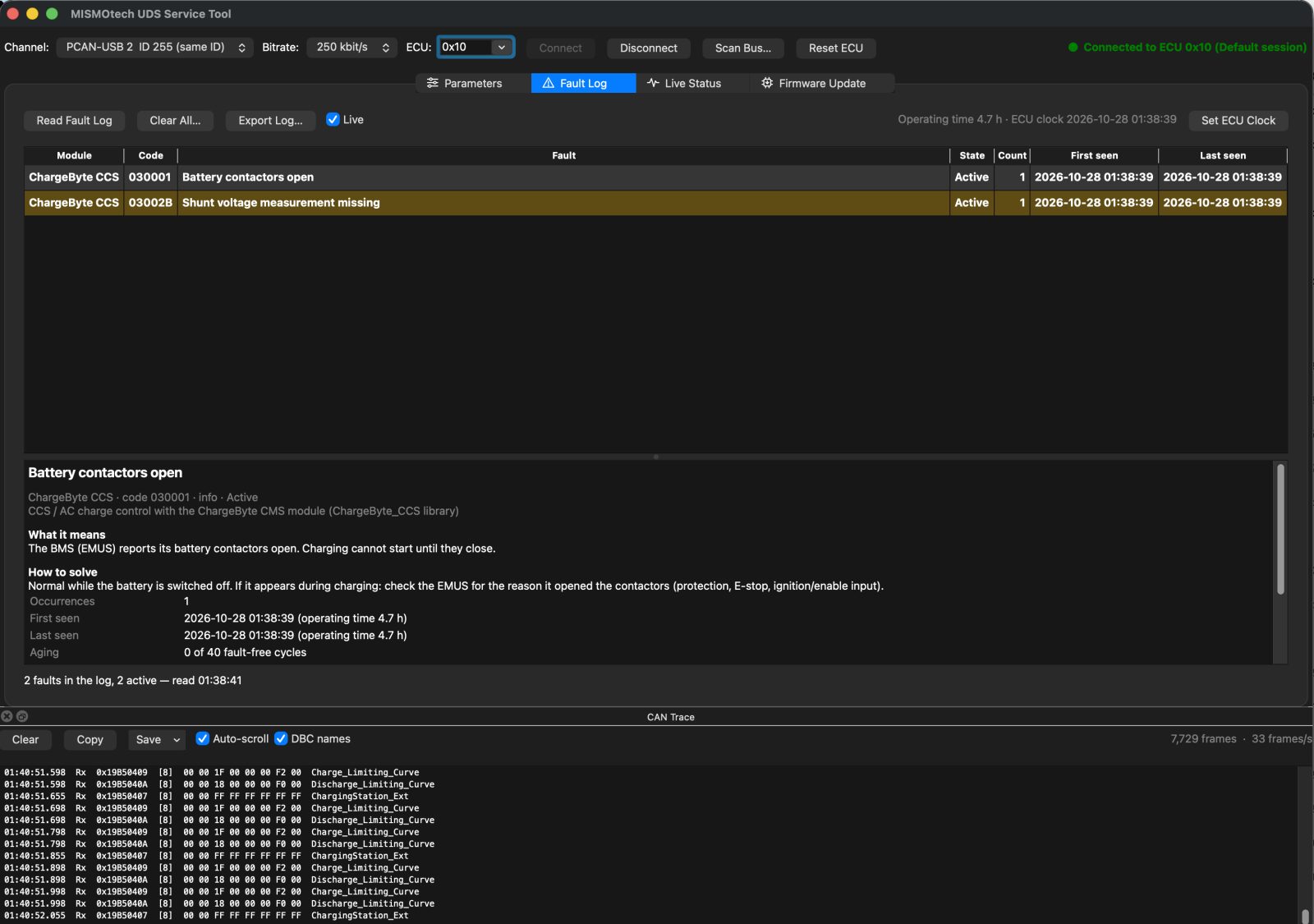
A service tool for MISMOtech ECUs
When a vehicle with one of our controllers comes into the workshop, the first questions are always the same: what does the controller think is wrong, how is it set up, and is it running the latest firmware? Until now, answering them meant a mix of CAN logging tools, DBC files and a call to me.
The MISMOtech UDS Service Tool puts all of that in one window. Plug a PCAN-USB adapter into the laptop and the vehicle's CAN bus, click Connect, and the tool reads the controller's parameters and fault log straight away.
Fault log that explains itself
The Fault Log tab lists every stored fault with its module, state (active or history), how often it occurred and when. Select one and it tells you, in plain words, what it means and how to solve it, together with the values the controller recorded at that moment. Faults from the charge module are decoded into module, reason and extra information instead of a bare number.
- Turn on Live and the table updates by itself as faults come and go — handy while you reproduce a problem.
- Export Log… saves the log as CSV or JSON for the service report.
- Set ECU Clock gives faults a real date and time. The controller only knows the time while it is on a DC fast charger or connected to the tool; otherwise a fault is stamped with operating hours.
Parameters, with a safety net
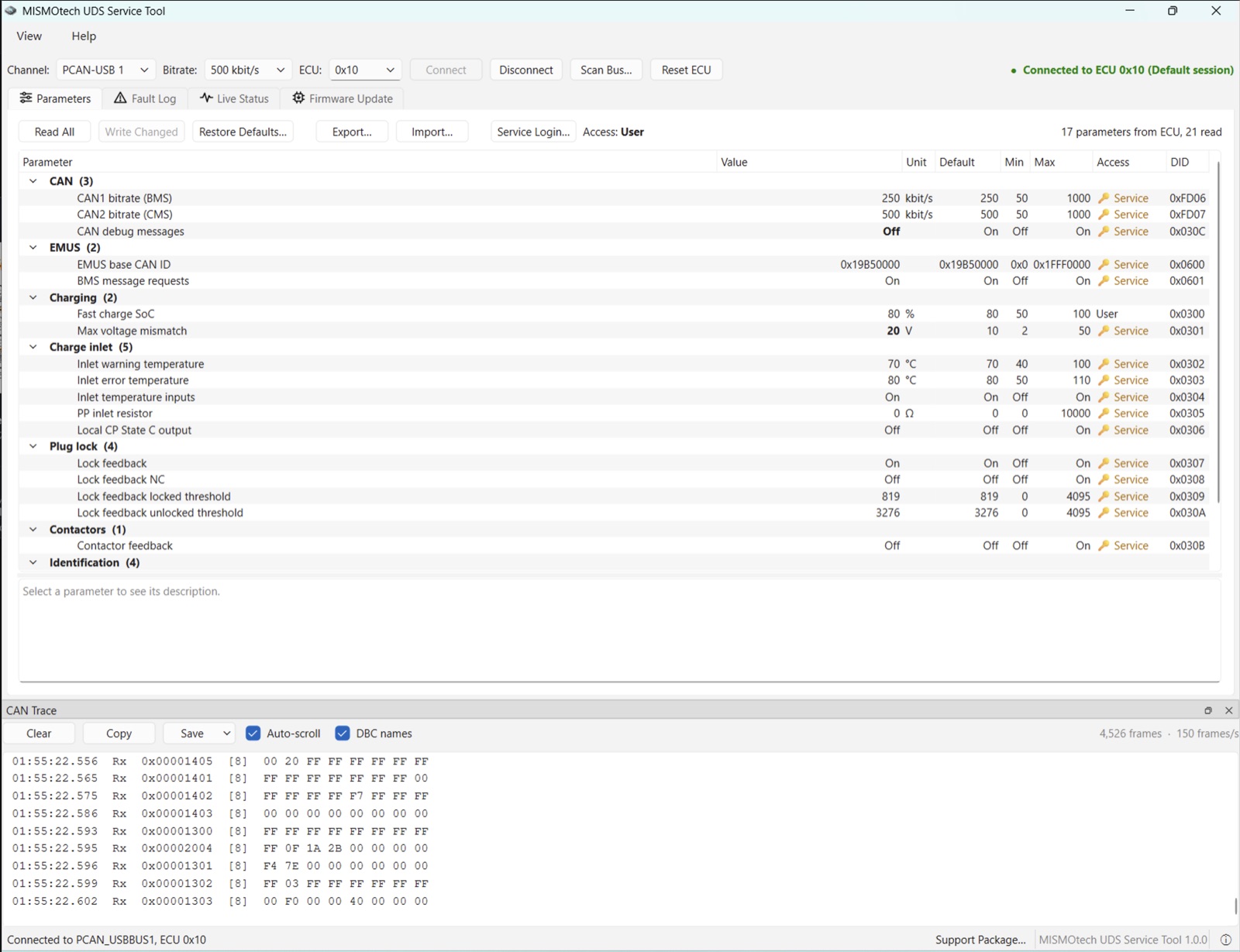
The Parameters tab shows every setting grouped by function — CAN, BMS, charging, charge inlet, plug lock, contactors — with unit, default, limits and a description. Changed values stay yellow until you write them, values that differ from the default are bold, and protected settings need a service login.
Export… saves a parameter file before you touch anything, and Import… loads one back — or copies a known-good setup onto a replacement unit. Changing the CAN bitrate is guided too: the tool warns first, and after the controller restarts it switches its own bitrate and reconnects.
See what is on the bus
- Live Status decodes the CAN traffic with the built-in MISMOtech DBC (add your own DBC files for the BMS or other nodes), grouped by sending node. Signals that stop arriving turn grey.
- The CAN Trace at the bottom shows every raw frame with message names and the current frame rate. Save can store just the part that matters: the seconds before the last tool error, before a fault became active, before a CAN error frame, or the last firmware update. The files open in SavvyCAN, PCAN-View or CANalyzer.
Firmware updates in the field
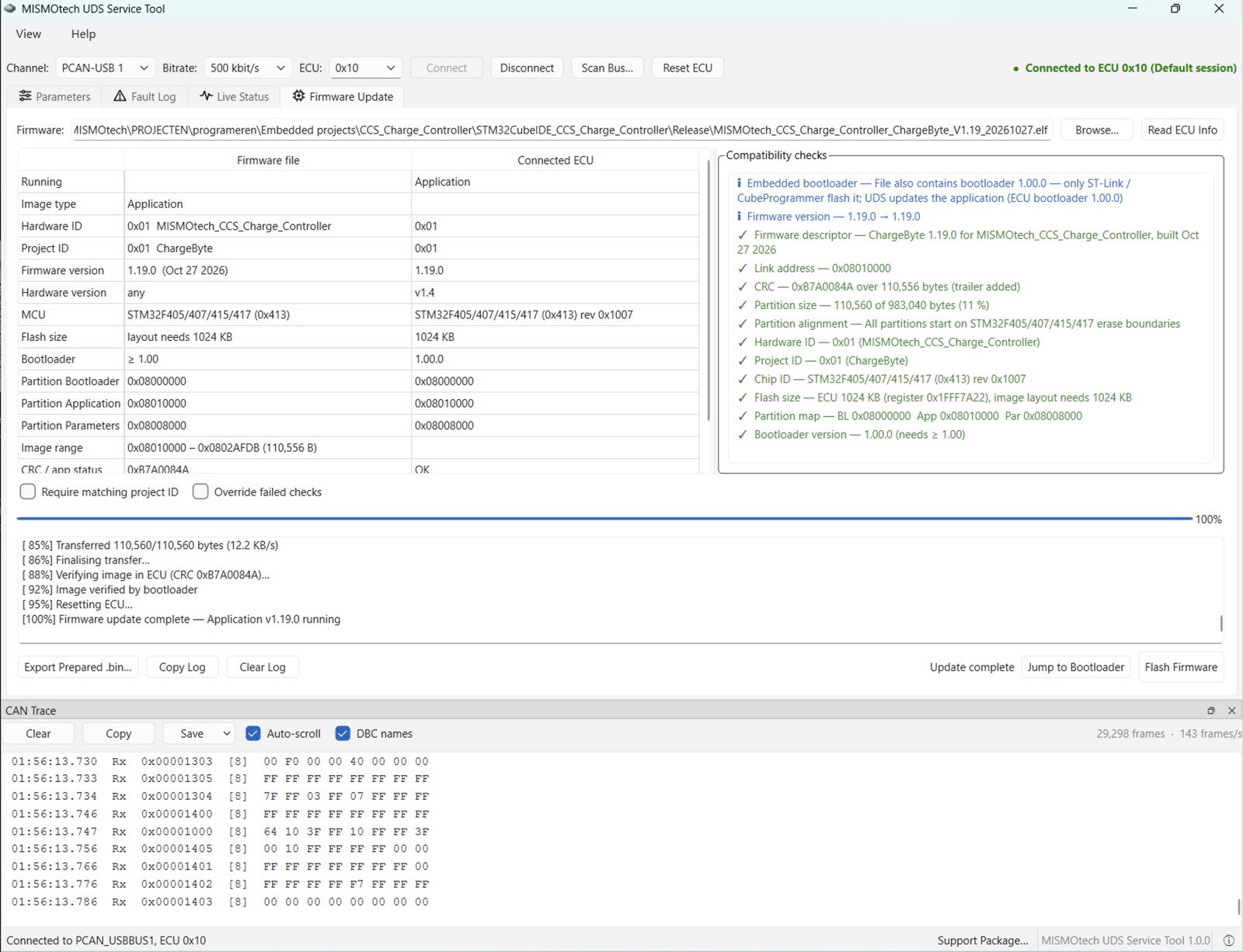
Pick the firmware file from MISMOtech and the tool checks it against the connected controller — chip, flash size, hardware ID and version, project — before anything is written. Every check green? Click Flash Firmware. The settings stay in place, and if the update is interrupted the controller waits in its bootloader, so you can simply connect and flash again.
More than one controller on a bus
Scan Bus… lists every MISMOtech controller that answers, with its address, serial number and firmware version. Two units fresh from the factory share the same address; the tool flags the conflict and lets you give one a new address without a restart.
When you need help
Something you can't solve on site? Click Support Package… and the tool saves one zip with the parameters, fault log, firmware details, CAN trace and its own log. Send it to us with a short description, and we see exactly what you saw. Keeping one from before and one from after your work with the service report also makes it easy to see what was changed when the vehicle comes back.
Getting the tool
The service tool runs on Windows and macOS, on both ARM and Intel computers, with a native build for each. It works with a PEAK PCAN-USB adapter, and has a built-in manual under Help → Manual. It is available to customers using MISMOtech controllers — email support@mismo-tech.com and we'll send you a copy.
More on the controller it was first built for: a CCS charge controller for EV conversions.